
The AI agent vs chatbot question sounds like a technology comparison. It is not. It is a question about what you need the software to do when a customer or a courier problem lands in your queue. A chatbot talks. It answers questions from a script or a knowledge base. An agent acts. It reads your systems, decides within limits you set, and takes an action behind a human approval. Both are useful. They are useful for different jobs, and buying the wrong one is an expensive way to learn the difference.
The confusion is understandable, because vendors sell both under the same word: “AI.” A D2C brand in India gets pitched a chatbot to fix a rising RTO rate. A 3PL gets pitched an “AI assistant” that turns out to be an FAQ page with a typing animation. The demo always looks good. The question is what happens on a Tuesday morning when Delhivery marks 40 parcels NDR and your customers start asking where their orders are.
What a chatbot actually does
A chatbot is a conversation layer. It matches what the customer typed to an intent, then returns an answer. The answer comes from a script, a decision tree, or a knowledge base it can search. Good modern chatbots do this well. They handle typos, Hinglish, and vague phrasing far better than the menu bots of five years ago.
What a chatbot does not do is act on your systems. It can tell a customer what your returns policy says. It cannot check whether the return pickup actually happened in the Ekart portal. It can read out an order status that your store platform already knows. It cannot notice that the status has been stuck for three days and do something about it. The chatbot’s world ends at the edge of the conversation window.
This is a design boundary, not a defect. A chatbot is a receptionist, and a good receptionist is valuable. The mistake is asking the receptionist to run the warehouse.
Where a chatbot is genuinely enough
There is a large, honest category of work where a chatbot is the right tool and an agent would be overkill. It shares one property: the answer already exists somewhere, and the job ends when the customer has it.
- FAQs and policies. Return windows, exchange rules, delivery charges by zone, COD limits. This is static knowledge. A chatbot on WhatsApp answers these at 2 a.m. for a few paise per conversation instead of tying up a support agent.
- Hours and locations. Store timings, serviceable pin codes, pickup point addresses. Nobody should be paid to answer these manually.
- Plain status lookups. “Where is my order” when the shipment is moving normally. The chatbot pulls the status from your store or aggregator and reads it out. WISMO volume drops, and the tickets that remain are the ones that actually need attention.
- Structured intake. Collecting an order ID, a photo of a damaged parcel, a preferred callback time, and raising a clean ticket for a human. This is form-filling with a friendly face, and chatbots do it reliably.
If your support queue is mostly these four categories, buy a good chatbot, connect it to WhatsApp, and stop reading. That is a real outcome and it is not a small one.
Where chatbots fail: multi-step operations work
The failure starts where the job crosses systems. Real operations work in India rarely lives in one place. A single delivery exception touches the courier portal, your transport management system (TMS), the customer on WhatsApp, and sometimes a payment or refund system. The chatbot can talk about all of these. It cannot move between them and close the loop.
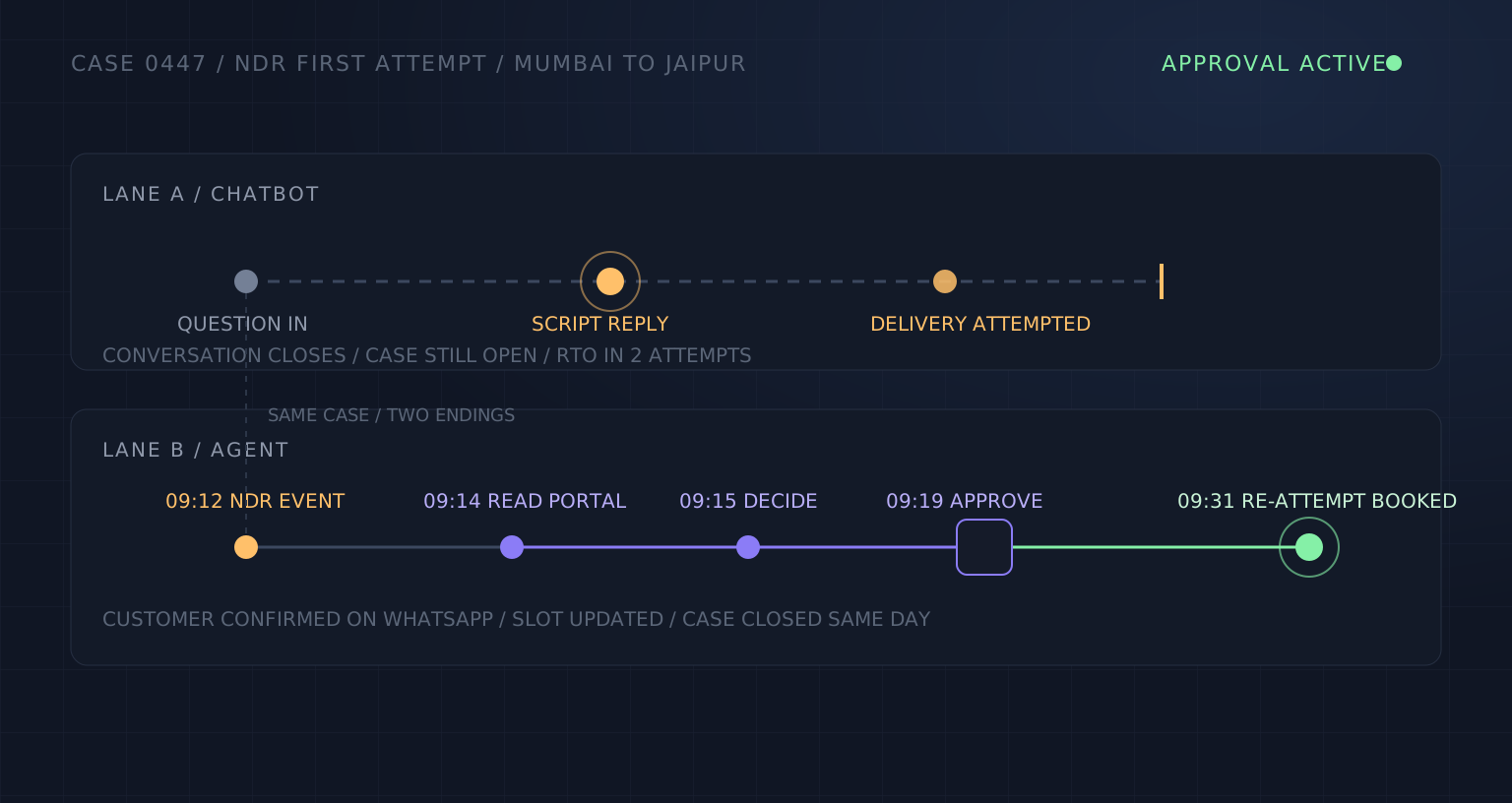
Take the most common example. A parcel from Mumbai to Jaipur gets a non-delivery report (NDR) on the first attempt: “customer not available.” Left alone, most couriers will try twice more, then mark it return to origin (RTO). The chatbot’s version of this story is that the customer messages “where is my order,” gets told “delivery attempted,” and replies in anger. The RTO happens anyway, at a cost of ₹150-₹250 in freight and handling before the lost sale.
The agent’s version is different. The system reads the NDR event in the courier portal within minutes. It checks the order value and the delivery history in your TMS. It messages the customer on WhatsApp to confirm availability and takes a landmark or an updated time slot. It schedules the re-attempt in the courier portal. And it does the consequential steps, the re-attempt booking and any refund hold, behind a supervisor’s approval, with the evidence attached. The chatbot’s job in this story is one message. The agent’s job is the other six steps.
The pattern generalizes. Courier weight discrepancies, stuck COD remittances, festive-season backlog triage, re-routing parcels away from a congested hub: all of these are read-decide-act loops across two or three systems. None of them end in a reply.
What an AI agent does differently
Three capabilities separate an agent from a chatbot, and you can test each one in a demo if you insist on seeing it.
- It reads systems, not just messages. Courier APIs, portal events, TMS records, order platforms. The agent’s input is the state of your operation, not only what a customer typed.
- It decides within limits. Given an NDR, the agent works out the next best action: re-attempt with a confirmed slot, escalate to a supervisor, or let it go to RTO because the order value does not justify the effort. The limits, in rupees and categories, are set by your team, not the vendor.
- It acts behind approval. A re-route, a re-attempt, a refund hold: these change the state of real systems, so they go out with a human sign-off until a category has proven itself accurate for weeks. Trust is earned in stages, from suggestions only, to approval-gated actions, to routine autopilot inside agreed limits.
We covered a related comparison in our piece on RPA vs AI agents. The distinction there was scripted bots versus agents that handle variance. The chatbot question is simpler: conversation versus action. A chatbot is the front of the house. An agent is the back of the house that the front keeps promising things about.
A decision table for ops leaders
Run your top five ticket or case categories through these questions. The pattern of answers tells you what to buy.
- Does the job end in a reply? If yes, a chatbot handles it. FAQs, hours, policies, normal status lookups.
- Does the job require checking two or more systems before anyone can answer? If yes, a chatbot will stall or bluff. This is agent territory.
- Does closing the job mean changing something in a courier portal, TMS, or payment system? If yes, only an agent can close it, and only behind approval.
- Is the volume spiky, like Diwali-season parcel surges? Chatbots absorb conversational spikes well. If the spike is in exceptions and follow-ups, headcount and chatbots both break, and you need action capacity.
- Is the cost of a wrong action high? That is not a reason to avoid agents. It is a reason to insist on the approval gate and the phased trust model, whatever you buy.
Most operations teams we talk to find their queue splits roughly in two: a large head of simple conversations, and a long tail of multi-step cases that carries most of the cost and most of the customer anger. The right answer is often both tools, each doing the half it is built for, with the chatbot handing cases to the agent instead of apologizing for them.
What this does not fix
Agents have honest limits too, and you should hear them before a demo, not after a contract. An agent is only as good as the data it reads. Courier status codes are inconsistent across Delhivery, Xpressbees, Ekart and Blue Dart; scans get missed; addresses stay incomplete. The agent works around this reality, it does not clean it up.
Agents also do not replace judgment. Damaged-goods disputes, high-value RTO calls, key-account exceptions: these stay with people, permanently. The approval rules and rupee limits are set with your supervisors and can be tightened at any time. And neither tool fixes a broken process. If your courier allocation logic sends fragile goods through the cheapest lane, software will faithfully execute that mistake at scale.
The decision itself is simpler than the market makes it sound. Map one week of your queue. Mark each case as “ends in a reply” or “ends in an action.” The split will tell you what to buy, and it costs nothing but a few hours. That is the same diagnostic-first discipline we recommend before any automation spend: measure the work first, then choose the tool that matches it.